
Managing Backups in Enhance
Learn how to manage your backups and restores from one convenient interface in Enhance Control Panel.
To manage your backups and restore them if necessary, follow these steps:
- Log in to your Enhance control panel.
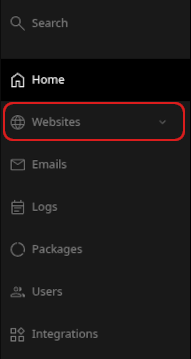
- In the left sidebar, click Websites:
-
On the Manage websites page, click the website you want to manage.
-
A list of tabs appears at the top of the page. Click the Backups tab:

-
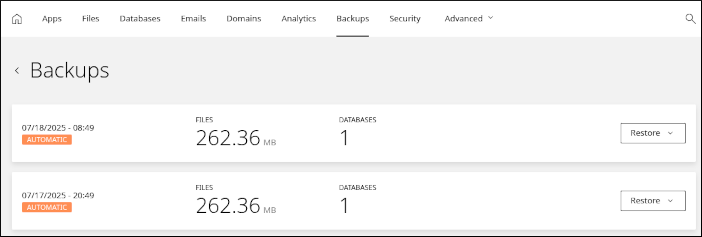
The Backups page appears with a list of automatic backups generated for your account:
-
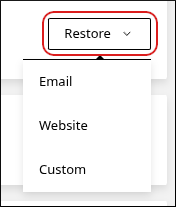
To restore a backup, click Restore and then select an option:
-
Email: This option restores email messages for any email accounts you have.
ImportantBe careful restoring emails. Any email messages newer than the date of the backup may be lost.
-
Website: This option restores the website files for your account.
-
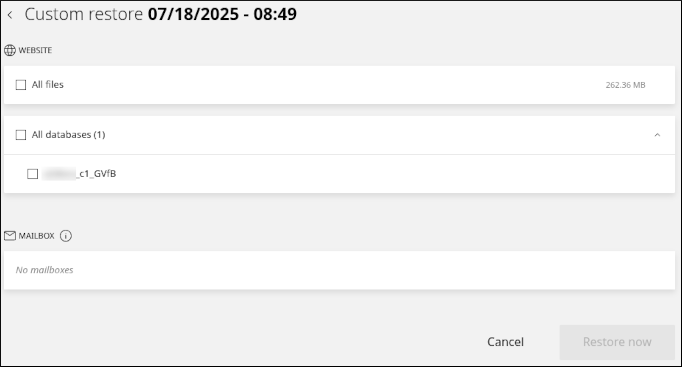
Custom: This option enables you to select a custom combination of items to restore. You can restore email, website files, and databases:
-
Related articles
- Managing your WordPress site in Enhance
- Installing an SSL certificate in Enhance
- Managing your Domains in Enhance
- Managing your Email in Enhance
- Using the File Manager in Enhance
- Managing your MySQL databases in Enhance
- Managing FTP accounts in Enhance
- Changing PHP versions and settings in Enhance
- Configuring SSH access in Enhance