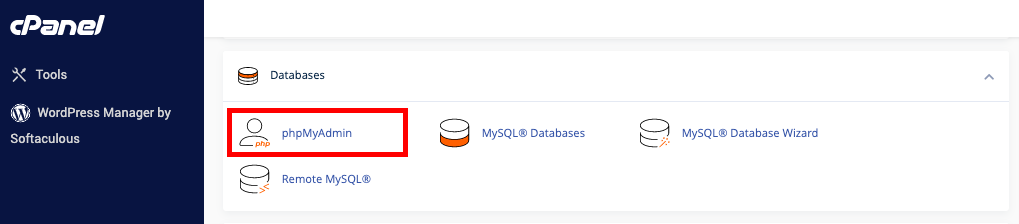
- Accessing databases – Through the cPanel’s phpMyAdmin, you can access your databases.
- Creating databases and users – You can use phpMyAdmin to create databases and users.
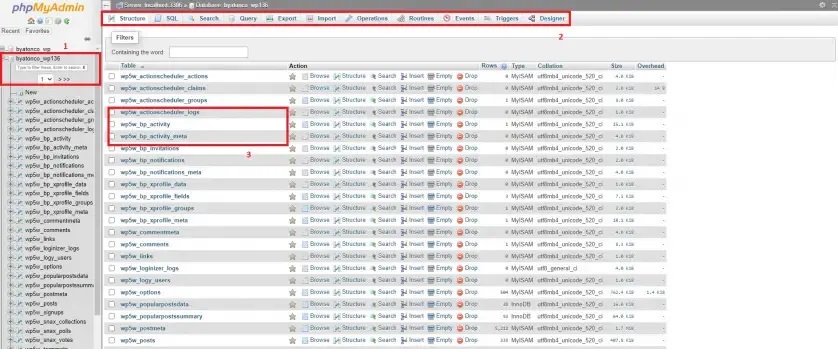
- Selecting databases – To view the database structure, you need to click on the name of the database located in the left column of the home page. The structure of the database will be shown by clicking on the name of the database. The structure will show individual names of tables that your database is made out of.
- Browsing databases – Once a database has been selected, you can click on the Browse link that is beside the table name while you’re in the Structure view in order to browse each table. The Browse view displays data rows in the database. Based on the current view, there is also a link to Create PHP Code. By clicking > or >>, you can go through the rows of data.
- Viewing MySQL processes – When you select the tab SQL and run the command showprocesslist, you will be able to see the current MySQL processes. Click on the kill link that is located left of the process ID number if you want to kill a process.
- Executing SQL queries – Using the Query and Structure tabs lets you run several queries with semicolons that separate different queries.