

Manage email
- Log in to your Enhance control panel.
-
In the left sidebar, click Websites.
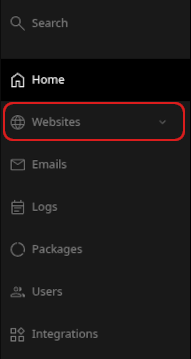
- On the Manage websites page, click the website you want to manage.
-
Click the Emails tab.

-
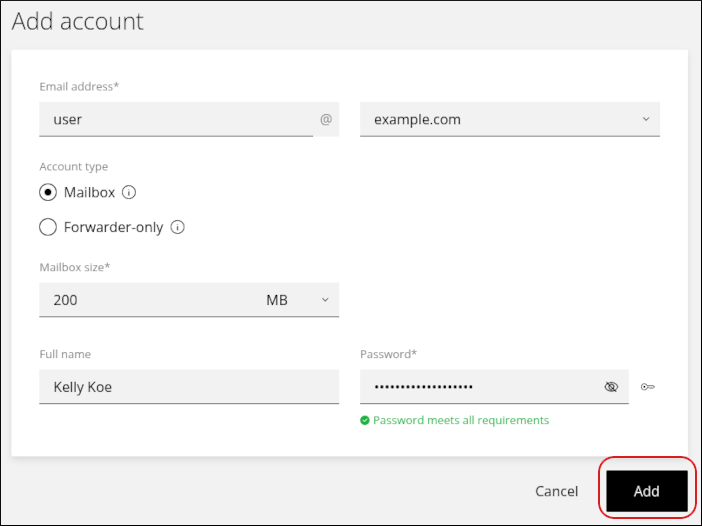
To add an account, click Add account.

-
Complete the fields, and then click Add.
-
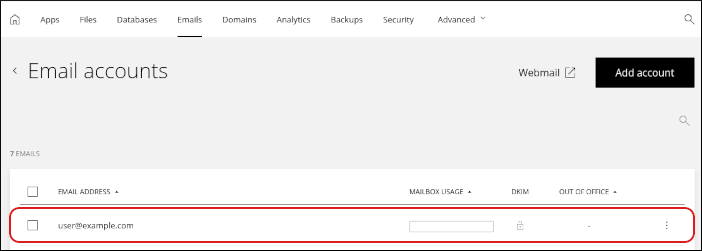
To modify an existing account, click the account in the list.
What you can manage
For each email account, you can change the following settings:- Display name
- Mailbox size
- Password
- Forwarders
- Spam settings
- Out-of-office notifications (autoresponders)
Related articles
- Managing your WordPress site in Enhance
- Installing an SSL certificate in Enhance
- Managing your Domains in Enhance
- Using the File Manager in Enhance
- Managing Backups in Enhance
- Managing your MySQL databases in Enhance
- Managing FTP accounts in Enhance
- Changing PHP versions and settings in Enhance
- Configuring SSH access in Enhance