How to tell if an email is legitimate
Phishing emails typically have links to sophisticated pages posing as legitimate site pages. These pages often pose as portals where you would supply sensitive information, such as the official Verpex login page. However, these pages will instead send any and all information you have supplied on the page (such as your username and password) to those perpetrating the scam. As frustrating as dealing with phishing attempts may be, it’s relatively easy to distinguish legitimate attempts from those made with nefarious intentions. If you’re wondering whether or not you have received a legitimate email from Verpex, consider the following tips:- Any email requesting that you take action on an account or update user information will be accompanied by a request that you submit a ticket or call us if you have any questions.
- If you receive an email requesting that you log in to your account, do not click any login links included in the email. Instead, visit verpex.com directly and log in to your account from there. This tip can be used to protect yourself from any online phishing scam, not just those targeting Verpex.
- Never submit confidential information in a form embedded within an email message.
- Before clicking any link within an email, hover your mouse pointer over the link to verify that the destination URL correlates to the destination you are expecting. The page that will open if you click on the link should appear near the mouse pointer or at the bottom of the browser window. The link should match the description provided. If the link does not match, you may very well be dealing with a phishing email.
- Verpex will never ask you to provide your password, credit card number, or any other personal information directly through email.
- Verpex will only ever email the address that you have provided in your customer account. Check at which address you have previously received correspondence.
- If we ever do request information or action from you, we will do so within our support ticket system. The most secure way to reply to us is to go directly to verpex.com , log in, and submit your reply directly on our website.
How to keep login information secure
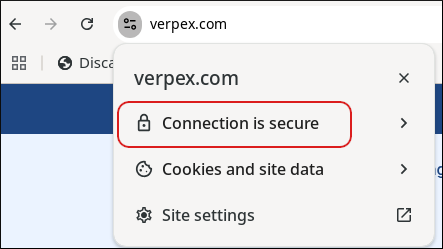
You can double-check that you are logging into the correct Verpex site by ensuring that you see the locked padlock validation icon in your browser bar when visiting verpex.com. You can click Connection is secure to see more information about the connection: