

- Pick up the IP address for the server from which you intend to establish the remote connection. http://whatismyipaddress.com/ should help you find this IP address.
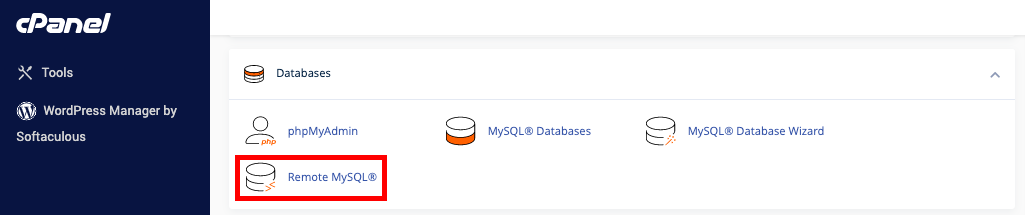
- Login to your account on cPanel, look for ‘Databases’, and then ‘Remote MySQL’.
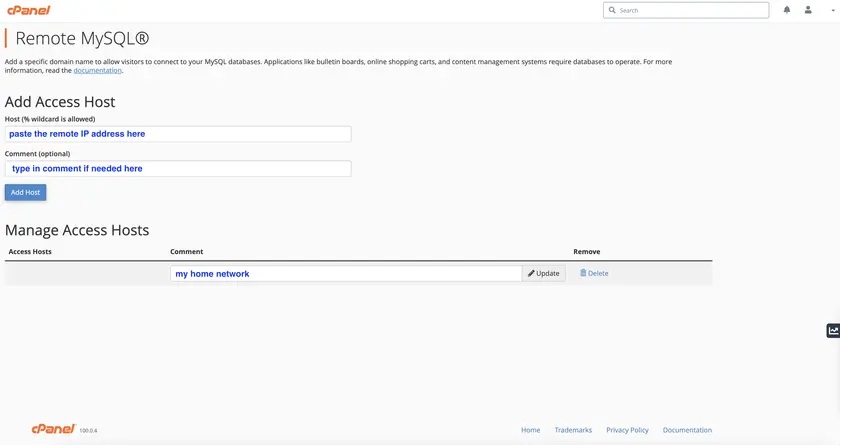
- Clicking on it will bring you to a new page with a ‘Host’ field where you can enter the IP address (or host name) we identified in the beginning, and add it by selecting ‘Add Host’. If you want to grant database access to, say, all IP addresses starting with 167.45.0, you can use the ‘%’ character, by just entering 167.45.0.%.
- Popular software for configuring your remote MySQL include MySQL Workbench (https://www.mysql.com/products/workbench/) or Navicat (https://www.navicat.com/en/products/navicat-for-mysql). For this purpose, you’ll need your hostname, the name of your database, the credentials for the database, the port no. 3306, and if needed, the connection method should be chosen as TCP/IP.