> ## Documentation Index
> Fetch the complete documentation index at: https://kb.verpex.com/llms.txt
> Use this file to discover all available pages before exploring further.
# Managing Backups in Enhance
> Learn how to manage automatic backups and restore your website, email, and databases in the Enhance control panel.
To manage your backups and restore them if necessary, follow these steps:
1. Log in to your Enhance control panel.
2. In the left sidebar, click **Websites**:
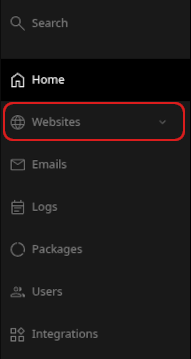
2. On the **Manage websites** page, click the website you want to manage.
3. A list of tabs appears at the top of the page. Click the **Backups** tab:

4. The **Backups** page appears with a list of automatic backups generated for your account:
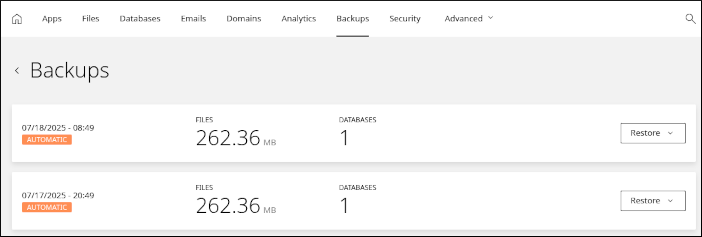
5. To restore a backup, click **Restore** and then select an option:
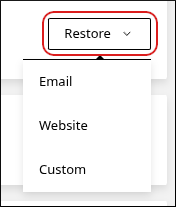
* **Email**: This option restores email messages for any email accounts you have.
Be careful restoring emails. Any email messages newer than the date of the backup may be lost.
* **Website**: This option restores the website files for your account.
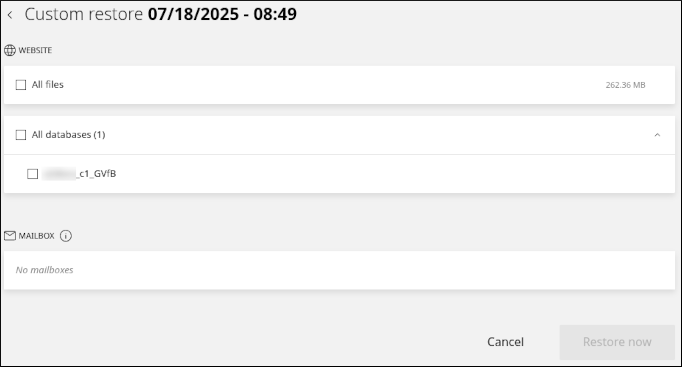
* **Custom**: This option enables you to select a custom combination of items to restore. You can restore email, website files, and databases:
## Related articles
* [Managing your WordPress site in Enhance](/enhance/managing-your-wordpress-site-in-enhance)
* [Installing an SSL certificate in Enhance](/enhance/installing-an-ssl-certificate-in-enhance)
* [Managing your Domains in Enhance](/enhance/managing-your-domains-in-enhance)
* [Managing your Email in Enhance](/enhance/managing-your-email-in-enhance)
* [Using the File Manager in Enhance](/enhance/using-the-file-manager-in-enhance)
* [Managing your MySQL databases in Enhance](/enhance/managing-your-mysql-databases-in-enhance)
* [Managing FTP accounts in Enhance](/enhance/managing-ftp-accounts-in-enhance)
* [Changing PHP versions and settings in Enhance](/enhance/changing-php-versions-and-settings-in-enhance)
* [Configuring SSH access in Enhance](/enhance/configuring-ssh-access-in-enhance)