> ## Documentation Index
> Fetch the complete documentation index at: https://kb.verpex.com/llms.txt
> Use this file to discover all available pages before exploring further.
# Installing an SSL Certificate in Enhance
> Learn how to install a custom SSL certificate for a website in the Enhance control panel.
In many cases, you do not need to install an SSL certificate manually. For example, if you are using the free SSL certificate, it is installed automatically. Use this procedure only if you need to install an SSL certificate that you purchased from Verpex or another provider.
## Install an SSL certificate
1. Log in to your Enhance control panel.
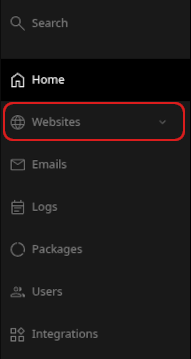
2. In the left sidebar, click **Websites**.
3. On the **Manage websites** page, click the website you want to manage.
4. Click the **Security** tab.

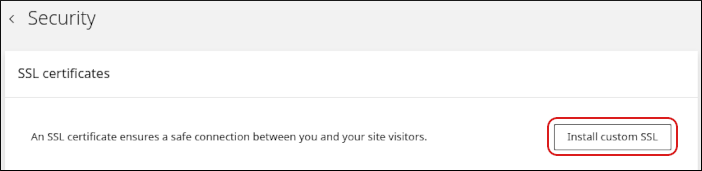
5. On the **Security** page, in the **SSL certificates** section, click **Install custom SSL**.
6. In the **Domain** list, select the domain where you want to install the SSL certificate.
7. In the **Certificate (CRT)** field, paste the certificate text. To upload the certificate file instead, click **Upload file**.
8. In the **Private key** field, paste the private key text. To upload the private key file instead, click **Upload file**.
9. Click **Upload**.
The Hosting Panel installs the certificate and private key for the selected domain.
## Related articles
* [Managing your WordPress site in Enhance](/enhance/managing-your-wordpress-site-in-enhance)
* [Managing your Domains in Enhance](/enhance/managing-your-domains-in-enhance)
* [Managing your Email in Enhance](/enhance/managing-your-email-in-enhance)
* [Using the File Manager in Enhance](/enhance/using-the-file-manager-in-enhance)
* [Managing Backups in Enhance](/enhance/managing-backups-in-enhance)
* [Managing your MySQL databases in Enhance](/enhance/managing-your-mysql-databases-in-enhance)
* [Managing FTP accounts in Enhance](/enhance/managing-ftp-accounts-in-enhance)
* [Changing PHP versions and settings in Enhance](/enhance/changing-php-versions-and-settings-in-enhance)
* [Configuring SSH access in Enhance](/enhance/configuring-ssh-access-in-enhance)