> ## Documentation Index
> Fetch the complete documentation index at: https://kb.verpex.com/llms.txt
> Use this file to discover all available pages before exploring further.
# How can I Register a Domain with Verpex?
> Registering a domain with Verpex is simple and instant
Registering a domain with Verpex is simple and instant
## What is a domain name?
A domain is an identifier, it is what is used to identify your business on the net, more like an address directing people to your business Domain names work in the format\[unique name].\[tld]. You can choose a variety of tld’s (top-level domains).
You can register your domain by following the steps stated below:
1. Visit our website [Verpex.com](https://verpex.com)
2. On the dashboard, click the drop-down arrow beside ‘Domains’ and choose [Domain Registration](https://verpex.com/domain-registration)
3. Enter your domain in the search box, and click the search button you find information about the availability of the domain, and it populates other domain names you might be interested in.
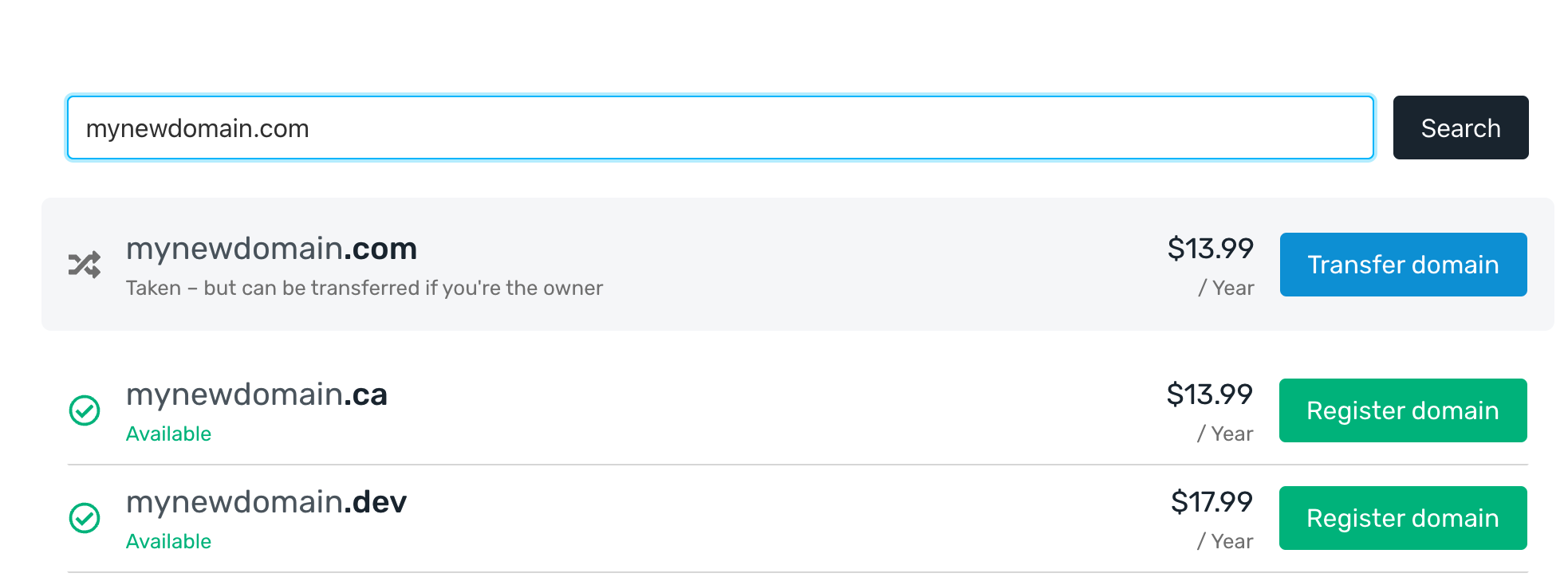 4. If the domain is available, click `Register domain`. If not try the search again or try one of the alternative suggestions.
5. Once you choose a domain name you will be prompted to enter your domain details such as your name and address.
6. Click Add to Cart. You can either add more products to your basket or check out immediately.
That’s it - as soon as payment is made your domain will be registered. If there are any additional bits of information we need we will be in touch.
## Registration length
By default domains register for one year. However you can choose to register for more than one year (sometimes up to 10 years) depending on the extension. This choice is provided to you after you click `Register domain`
## Domain Transfers
If you have a domain elsewhere you can also [transfer it to Verpex?](/domains/how-can-i-transfer-my-domain-to-verpex).
4. If the domain is available, click `Register domain`. If not try the search again or try one of the alternative suggestions.
5. Once you choose a domain name you will be prompted to enter your domain details such as your name and address.
6. Click Add to Cart. You can either add more products to your basket or check out immediately.
That’s it - as soon as payment is made your domain will be registered. If there are any additional bits of information we need we will be in touch.
## Registration length
By default domains register for one year. However you can choose to register for more than one year (sometimes up to 10 years) depending on the extension. This choice is provided to you after you click `Register domain`
## Domain Transfers
If you have a domain elsewhere you can also [transfer it to Verpex?](/domains/how-can-i-transfer-my-domain-to-verpex).